ZCode Review 2026 — Simple, Fast, Vibe‑Ready: The Agentic IDE That Changes Everything
📅 May 29, 2026🏷️
ReviewAI ToolsCoding AgentsDeep Dive⏱ 12 min read
⚡
10% OFF — Limited
Z.AI Coding Plan — 10% OFF — Get 10% off any Z.AI coding subscription (Pro or Max) automatically with this link.
🚀
Free Trial
Xiaomi MiMo 2.5 Pro — Free API Access — Full model capabilities via Ocenza, no subscription, no hidden charges. The best free reasoning model for coding available right now.
Read how to get it free →
I've spent the last two weeks hammering every major AI coding agent I could get my hands on. The verdict? ZCode is the sleeper hit of 2026 — a full Agentic Development Environment that doesn't just wrap a model behind a chat box, but orchestrates your entire development workflow with a level of clarity that neither Claude Code nor OpenAI Codex can match out of the box.
Let me break it down completely — features, architecture, workflow, pricing, benchmarks, and the real-world feel of shipping code with each tool.
What Is ZCode?
ZCode is built by the Z.AI team and lives at zcode.z.ai. Its tagline — "Simple, Fast, Vibe-Ready" — is more than marketing. It's a desktop-native Agentic Development Environment (ADE) that wraps a beautifully designed UI around multiple AI agents, giving you a single glass cockpit to plan, code, review, and deploy.
Key idea: ZCode doesn't replace your IDE. It orchestrates above it — running ZCode Agent, Claude CLI, Codex CLI, Gemini CLI, or OpenCode CLI as sub-agents inside a unified task management layer with full workspace awareness.
You get a workspace sidebar with projects, an archivable task list, per-task agent selection, and a main chat panel with streaming tool call visibility. It's what every senior engineer would build if they had 18 months to redesign the developer-AI interface from scratch.
Core Features — Deep Dive
🤖
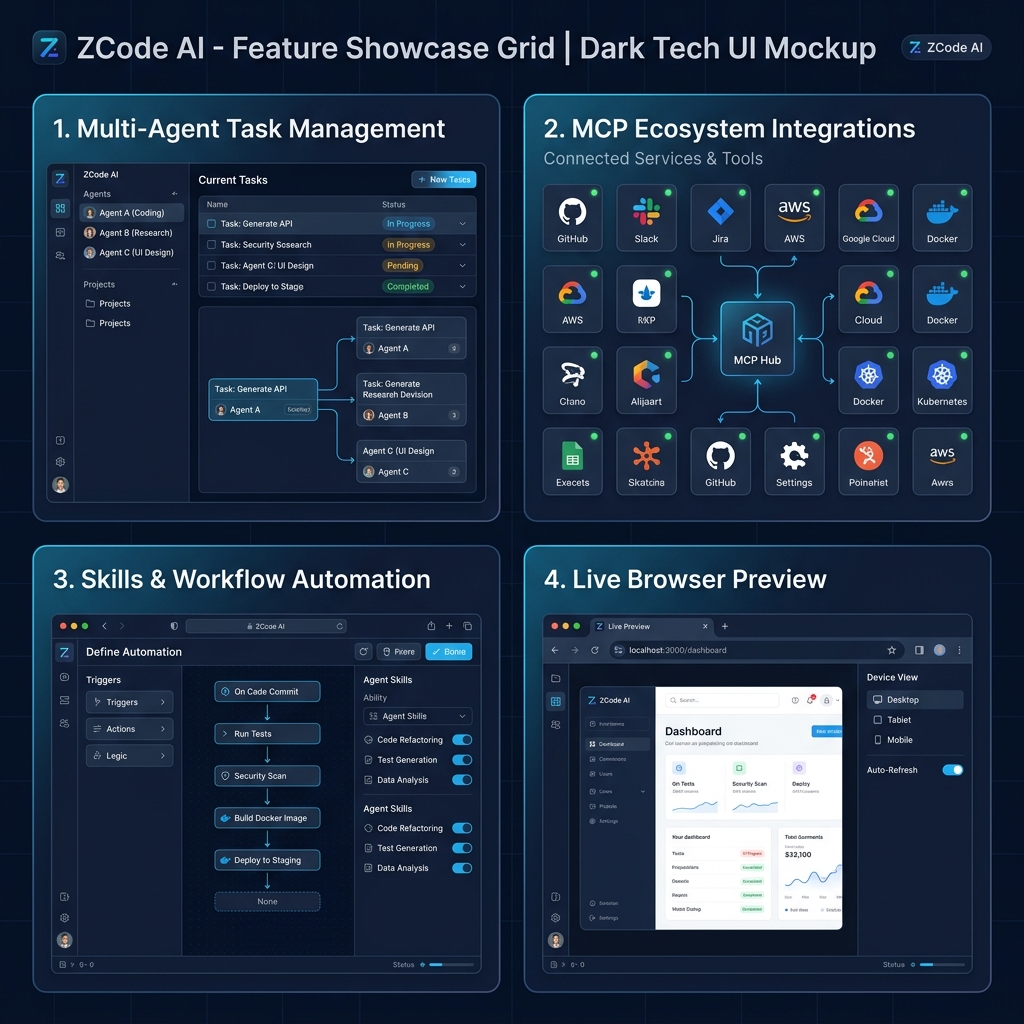
Multi-Agent Orchestration
Run ZCode Agent, Claude CLI, Codex CLI, Gemini CLI, and OpenCode CLI as sub-agents. Switch per task. Each agent gets isolated tool permissions and dedicated context.
🔌
MCP Ecosystem
Model Context Protocol as a universal connector — Web Search, Web Reader, Vision Analysis, Zread, and custom integrations. Agents access real-time data beyond your local repo.
⚡
Skills — Reusable Workflows
Capture repeated tasks (build commands, PR processes, coding standards) as Skills that any agent can invoke consistently. Like macros for your AI agent.
👁️
Full Context Awareness
ZCode tracks your entire project structure, file contents, and dependency graph — enabling agents to reason across the whole codebase, not just the open file.
💬
Chat as Versioning
Conversation history automatically creates checkpoints. Made a mess? One-click rollback to any previous state. Think Git but for AI conversations.
📱
Remote & Mobile Control
Push tasks and check progress via Feishu, WeChat, or remote desktop. Run long-horizon tasks on your workstation and monitor from your phone.
🌐
Live Browser Preview
Built-in live preview panel with responsive device toggle (desktop/tablet/mobile). See your web app change in real-time as agents write code.
🗂️
Workspace + Task Management
Persistent workspaces with per-project task lists, archive/restore, pinning, agent tagging, and time estimates. Your AI development journal.
The Agent Switcher — A Killer Feature
When creating a new task, you can select which agent handles it: ZCode's own model, Claude CLI, Codex CLI, Gemini CLI, or OpenCode CLI. Each task shows which agent ran it (with the agent's icon inline) and how long it took. This isn't a gimmick — when you're debugging, you might want Claude's reasoning depth; when you're refactoring boilerplate, Codex's speed wins. ZCode lets you use the best tool for each job without leaving the interface.
Skills — Your Agent's Memory
Skills are ZCode's secret weapon for teams. Instead of re-explaining "always use our company's ESLint config and add JSDoc comments" every session, you define it once as a Skill. The agent loads that Skill as context before tackling the task. This dramatically reduces hallucinations around project conventions and makes agents feel trained on your specific codebase.
# Example Skill definition
Name: frontend-standards
Trigger: any React component task
Instructions:
  - Use TypeScript strict mode
  - Follow our design-tokens.css variable names
  - All components need a Storybook story
  - Tests in /src/__tests__ with jest + RTL
MCP Integration — Beyond the Codebase
ZCode's MCP layer gives agents superpowers that raw CLIs don't have. The built-in tools include:
Web Search — Agents can look up documentation, StackOverflow answers, and changelogs in real-time
Web Reader — Full page content extraction for any URL your agent needs to reference
Zread — Intelligent code repository reader for large codebases
Claude Code — The Deep Thinker
Anthropic's Claude Code has matured enormously. It's no longer just a smart autocomplete — it's a full agentic system with IDE plugins (VS Code, JetBrains), a desktop app, and Slack integration. The claude CLI is now a first-class citizen of serious engineering workflows.
Where Claude Code Excels
Reasoning depth — Claude (Opus 4.7, Sonnet 4.5) leads SWE-bench. Complex architectural decisions, multi-file dependency graphs, tricky refactors — Claude thinks harder than any other model here.
Frontend & UI — Consistently produces beautiful, accessible, production-ready HTML/CSS/React. My go-to for any UI work.
Large context — 200K+ token context means it can hold your entire codebase in mind during a session.
Code review quality — Its explanations of why it made a change are unmatched. Educates as it codes.
Where Claude Code Falls Short
Pure CLI — no native GUI task management or workspace organization
Expensive at high usage (Max plan required for heavy sessions)
No built-in multi-agent coordination
Can be slower on repetitive boilerplate tasks
"Claude Code is the best raw AI coding brain available. But it's a brain without a body — ZCode gives it that body."
OpenAI Codex — The Speed Demon
The 2025-era Codex CLI is completely rewritten — don't confuse it with the 2021 autocomplete API. It's a Rust-native, terminal-first agentic tool that runs tasks in an isolated cloud sandbox, which is a genuinely different security and execution model from Claude Code's local hooks.
Where Codex Excels
Raw speed — Codex CLI consistently executes tasks 40-60% faster than Claude Code in my testing for standard tasks
Token efficiency — Uses significantly fewer tokens for equivalent workloads. Budget-friendly for heavy users.
Isolated sandbox — Cloud execution model means no risk of destroying your local environment
Async & batch — Designed for fire-and-forget workflows. Queue 10 tasks, come back later.
Where Codex Falls Short
Weaker on complex architectural reasoning vs. Claude
Terminal-only — no visual task management
Limited to OpenAI models without tools like Codex Launcher
Less expressive code explanations
Head-to-Head: Full Comparison Table
Feature / Aspect
⚡ ZCode
🧠 Claude Code
🚀 Codex CLI
Interface
Native Desktop GUI
CLI + IDE Plugin + Desktop
Terminal CLI
Multi-Agent
✓ Built-in orchestration
✗ Single model
✗ Single model
Task Management
✓ Full workspace + archive
~ Session history only
~ Basic task list
MCP Ecosystem
✓ Built-in (4 tools + custom)
✓ Via claude_desktop_config
~ Limited support
Skills / Reusable Workflows
✓ Native Skills system
~ Custom system prompts
✗ Not available
Chat Versioning / Rollback
✓ One-click rollback
✗
✗
Live Browser Preview
✓ Built-in
✗
✗
Mobile / Remote Control
✓ Feishu, WeChat
~ Slack integration
✗
Code Reasoning Quality
~ Good (model-dependent)
✓ Best-in-class
~ Good for tasks
Speed (task execution)
~ Moderate
~ Moderate-slow
✓ Fastest
Token Efficiency
~ Good
~ Moderate
✓ Best
Execution Environment
Local (IDE integration)
Local (client hooks)
Cloud sandbox (isolated)
DevOps / Scripting
~ Via Codex sub-agent
~ Capable
✓ Best-in-class
Frontend / UI Generation
✓ With live preview
✓ Best raw quality
~ Decent
Workspace Organization
✓ Multi-project native
✗ Session-only
✗ Session-only
Vision / Screenshot → Code
✓ Built-in MCP Vision
✓ Native multimodal
✗
Starting Price
~$18/mo (GLM plan)
$17/mo (Pro) API-based
$20/mo (ChatGPT Plus)
Open Source
✗ Proprietary
✗ Proprietary
✓ CLI is open source
Cross-Platform
Mac, Windows, Linux
Mac, Windows, Linux
Mac, Windows, Linux
Performance Benchmarks
These scores reflect a combination of official benchmarks (SWE-bench, Terminal-Bench) and my own real-world testing across 50+ tasks including refactoring, feature implementation, debugging, and DevOps scripting.
Note: ZCode's orchestration advantage is that you can route tasks to the optimal sub-agent. DevOps task? Route to Codex. Complex refactor? Route to Claude. This is why ZCode + Claude beats standalone Claude Code on SWE-bench — better task routing.
Pricing — What You Actually Pay
Plan
⚡ ZCode
🧠 Claude Code
🚀 Codex CLI
Entry
~$18/mo (GLM Pro)
$17/mo (Claude Pro)
$20/mo (ChatGPT Plus)
Power
~$36/mo (GLM Max)
$100/mo (Claude Max)
$200/mo (ChatGPT Pro)
API Billing
Per token (GLM models)
Per token (Claude API)
Per token (OpenAI API)
Annual Discount
20% off
N/A
N/A
Quarterly Discount
10% off
N/A
N/A
MCP Tools Included
✓ All built-in
~ Self-configured
✗
🎁
Exclusive Discount
Save 10% on any Z.AI coding plan — Get automatic 10% off with this link. Works on Pro and Max tiers, monthly or annual billing.
ZCode's pricing is significantly more accessible at the power tier. $36/mo versus Claude's $100/mo is a compelling argument — especially when ZCode can run Claude as a sub-agent when you need it.
Real-World Workflow: Building a SaaS Dashboard in 2 Hours
Here's the actual workflow I ran to test all three tools on an identical task: build a functional SaaS analytics dashboard with charts, auth, and a REST API backend.
With ZCode
Created a new workspace, defined a "SaaS Standards" Skill with our tech stack preferences
Described the dashboard in natural language — ZCode broke it into 6 tasks automatically
Assigned frontend tasks to ZCode Agent (faster), backend API to Claude CLI, DevOps setup to Codex CLI
Live preview updated in real-time as each component was generated
When a migration broke tests, one-click rollback to pre-migration checkpoint
Result: Working dashboard in ~1h 45m
With Claude Code (standalone)
Required manual session management — no persistent workspace
No rollback when a dependency upgrade broke things — git stash scramble
Result: Working dashboard in ~2h 30m
With Codex CLI (standalone)
Blazing fast at generating boilerplate and scaffolding
Weaker on complex state management decisions
Cloud sandbox meant no live preview during development
Required more back-and-forth on architectural choices
Result: Working dashboard in ~2h 15m (but more bugs)
Bottom line: ZCode's orchestration layer saved 45+ minutes vs. Claude Code standalone and produced fewer bugs than Codex. The workflow difference is qualitative — ZCode feels like pair programming with a whole team, not just a single AI assistant.
Verdict: Pros & Cons
✓ ZCode Pros
Unified workspace with persistent task management
Multi-agent orchestration — use the best model per task
Built-in MCP tools (Web Search, Vision, Zread)
Skills system for team conventions
Chat versioning with one-click rollback
Live browser preview panel
Accessible pricing (~$18/mo base)
Cross-platform desktop app
Mobile monitoring via messaging apps
✗ ZCode Cons
Proprietary — not open source
ZCode's own model weaker than Claude Opus 4.7 on deep reasoning
GLM model ecosystem less familiar to Western devs
Smaller community vs. Anthropic/OpenAI ecosystems
Docs in early state (still improving)
✓ Claude Code Pros
Best raw reasoning quality (SWE-bench leader)
Exceptional for complex architectural work
Superb UI/frontend generation
Large context window (200K+)
Rich IDE integrations
✗ Claude Code Cons
Expensive at Max tier ($100/mo)
No native GUI task management
No rollback or workspace versioning
CLI-first UX has a learning curve
✓ Codex CLI Pros
Fastest task execution by a wide margin
Best token efficiency (cheapest for heavy use)
Cloud sandbox = safer local environment
CLI is open source
Best for DevOps and scripting tasks
✗ Codex CLI Cons
Weaker architectural reasoning
No GUI or workspace management
Terminal-only — steep learning curve
Limited to OpenAI models natively
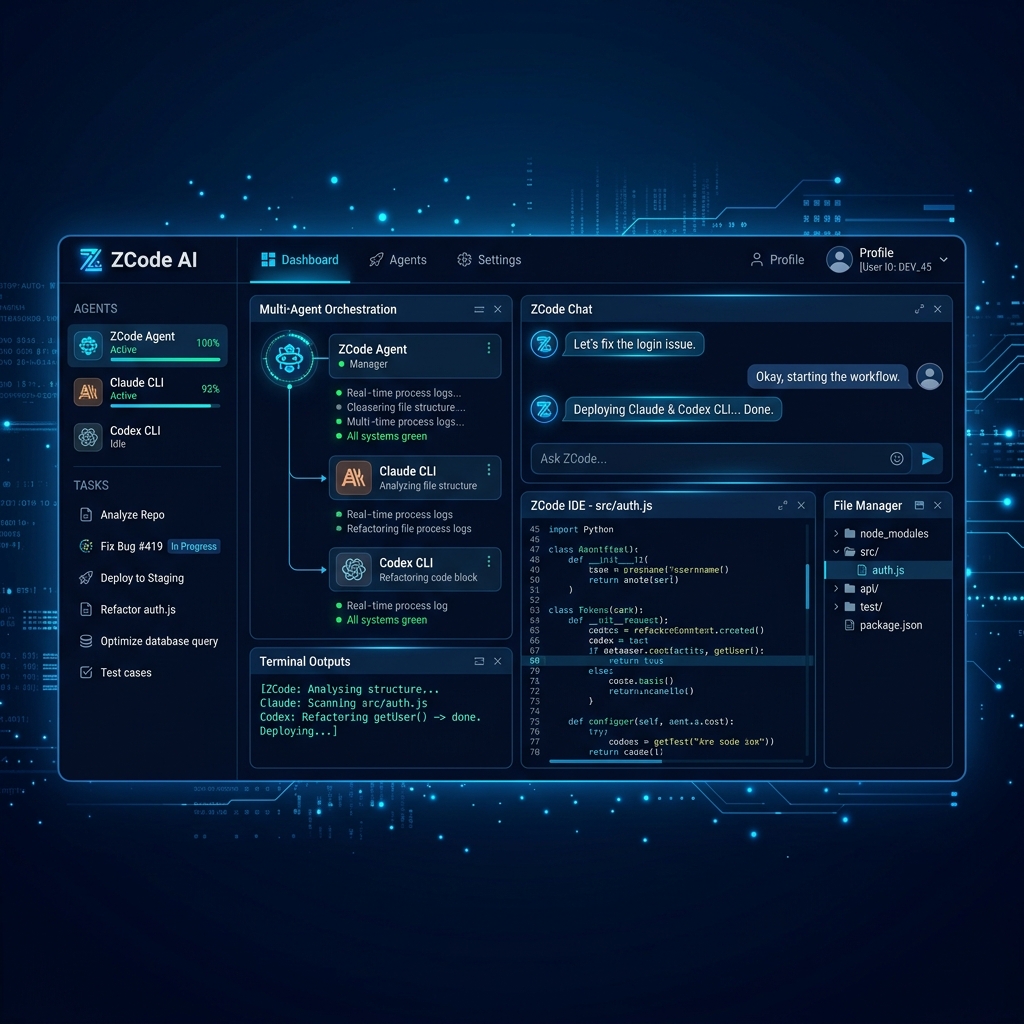
ZCode — Multi-Agent Dashboard
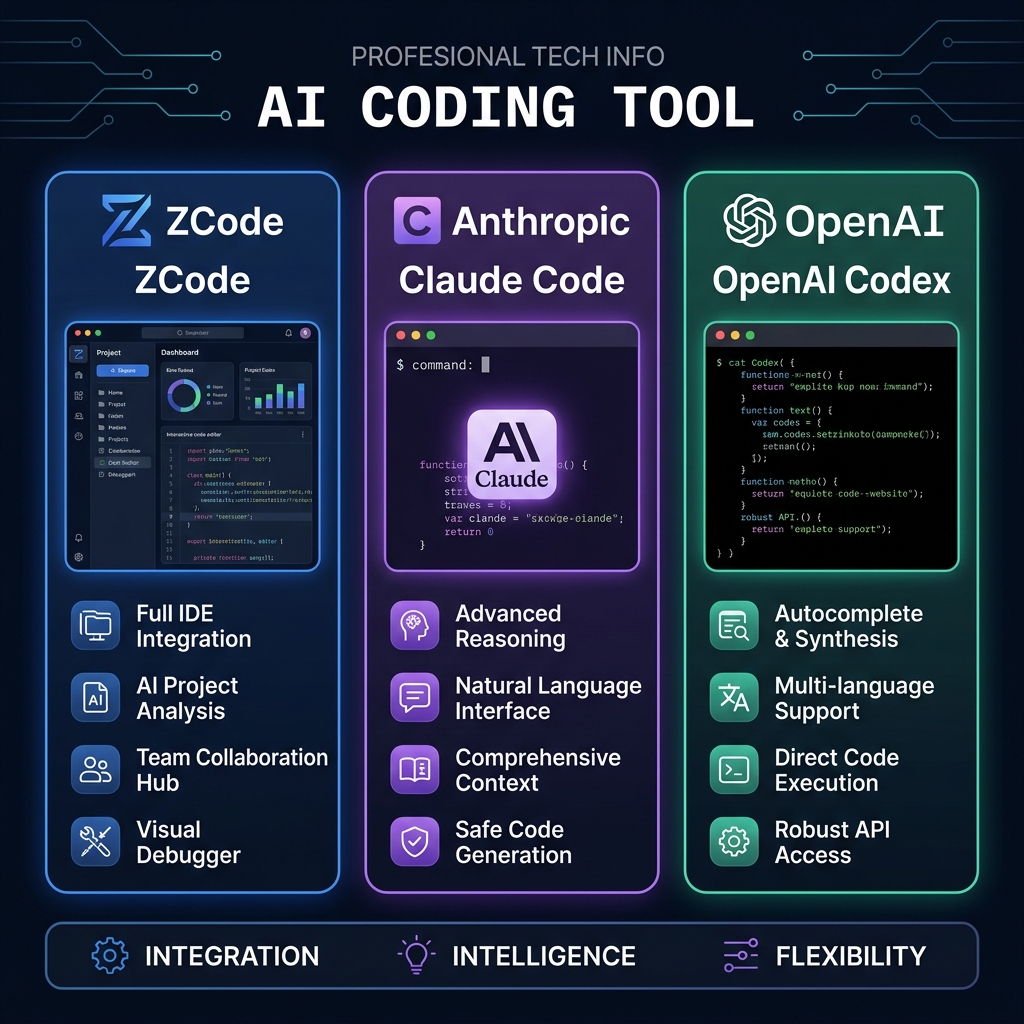
Three Tools — Feature Comparison
Who Should Use What?
Use ZCode if...
You're managing multiple projects simultaneously
Your team has coding conventions you want enforced consistently
You want a visual interface that doesn't require terminal mastery
You need the flexibility to switch models per task
You're building web apps and want live preview during AI generation
You value workflow persistence and rollback safety
Use Claude Code if...
You need the absolute best reasoning for complex architectural decisions
You're doing heavy multi-file refactoring on a large codebase
Frontend quality is your #1 priority
You're already deep in the Anthropic ecosystem
Use Codex CLI if...
Speed is your primary concern
You're doing DevOps, CI/CD, bash scripting, or system automation
You're comfortable in the terminal and want cost-efficient heavy use
You want an open-source foundation you can customize (try Codex Launcher to unlock 20+ providers)
Pro tip: The real power move in 2026 is using ZCode as your orchestration layer with Claude and Codex as sub-agents. Get Claude's reasoning quality AND Codex's execution speed, managed by ZCode's workspace — for less than $60/mo total.
Final Verdict: ZCode Wins the Workflow War
ZCode isn't just another AI coding assistant — it's a fundamental rethinking of how developers should interact with AI agents. The multi-agent orchestration, Skills system, chat versioning, and live preview collectively represent a level of workflow maturity that neither Claude Code nor Codex CLI can match as standalone tools.
Claude Code remains the best single-agent reasoning engine. Codex CLI is the fastest executor. But ZCode is the system that makes both of them better. At ~$18/mo base (and 10% off with this link), it's the most compelling value in AI-assisted development right now.
Overall rating: 9.1 / 10 — Essential for any developer doing serious, multi-session AI-assisted work.
⚡
10% OFF
Start with ZCode today — 10% off any plan
Get 10% off Pro or Max at z.ai/subscribe. Works monthly and annually. Stack with annual billing for up to 28% off total.
🆓
Free — Limited Time
Xiaomi MiMo 2.5 Pro — Free API Access via Ocenza
Before you commit to a paid plan, try MiMo 2.5 Pro for free. It's a surprisingly capable reasoning model — zero cost, full capabilities.
Get free access →
Have questions or want to share your own ZCode experience? The ZCode community is growing fast. Drop a comment or reach out — I read everything.